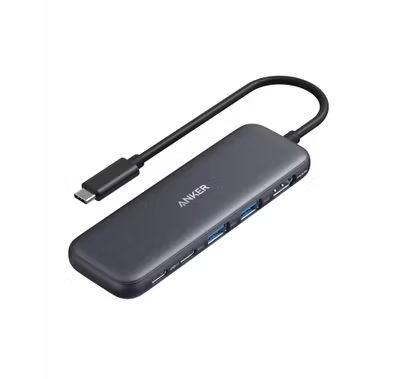
Porodo USB Hub PD35037IN1BK - 7-in-1, 100W PD, Black
Porodo USB-C Hub PDRDS71GY - 7-in-1, 100W PD, Gray
Porodo USB-C Hub PD91CHBGY - 9-in-1, 4K HDMI, 100W PD, Gray
Porodo USB Hub PDTC630GY - 6-in-1, 100W PD Charging, Black
Powerology USB-C Hub PWJT424BK - 4K HDMI, 100W PD, Black
Green Lion USB-C Hub GN8N1HUBMGBK - 8-in-1, 100W PD, Black
Powerology USB-C Hub PWYSTC8721GY - 12-in-1, 100W PD, Grey
Porodo USB Hub PDFWCH097GY - 4-Port USB 3.0, USB-C & USB-A, Gray
Green Lion USB-C Hub GHB7 - 7-in-1, Black
Porodo Multi-Port Hub PDIHRJ51GY - 100W PD, 5Gbps, Gray
Porodo USB Hub PD35038IN1BK - 8-in-1 Multi-Port, 100W PD, Black
Porodo USB Hub PBHUB0019GY - 4-in-1, USB-A & USB-C, Gray
Powerology USB-C Hub P61HBCGY - 6-in-1 4K HDMI PD 100W, Dark Gray
Green Lion USB-C Hub GN12N1CHUBGY - 12-in-1, 4K HDMI, Ethernet, Gray
Powerology USB-C Hub & Laptop Stand PWDC4DBBK - 13-in-1, 100W PD, Black
Green Lion USB Hub Docking Station GN4N10HUSBABK - 4-in-1, 100W PD, Black
Green Lion USB Hub Docking Station GN4N11HUSBCBK - 4-in-1, 100W PD, Black
Powerology Multi-Function Hub PWFX2508AGY - Dual HDMI 4K@60Hz, USB-C PD 100W, Grey
FAQ
How do I know if a USB hub is compatible with my laptop or phone?
To check compatibility, look at the ports on your device (USB-A, USB-C, etc.) and match them with the hub’s ports. Also, check if your device supports OTG (On-The-Go) if you want to use it with a phone or tablet. Some hubs work only with certain operating systems, so always read the product description for supported devices. For example, a USB-C hub may not work with older laptops that only have USB-A ports. If you’re unsure, contact Naml’s support with your device model for advice. Choosing the right hub ensures all your devices connect smoothly.What’s the difference between powered and non-powered USB hubs?
Powered USB hubs have their own power adapter and can supply more electricity to connected devices, which is useful for charging phones, tablets, or running external hard drives. Non-powered hubs draw power only from your computer, so they’re better for low-power devices like mice or keyboards. If you plan to connect several high-power devices, a powered hub is safer and more reliable. For example, if you use a lot of external drives or want to charge multiple devices at once, go for a powered hub. Always check the product specs to see if it comes with a power adapter.How can I tell if a USB hub supports fast data transfer speeds?
Check the USB version listed in the product details—USB 3.0, 3.1, or higher offer much faster speeds than USB 2.0. For example, USB 3.0 can transfer up to 5Gbps, while USB 2.0 is limited to 480Mbps. Also, look for blue-colored ports, which usually indicate USB 3.0 or above. If you need to transfer large files or use external SSDs, choose a hub with the latest USB version. Always match the hub’s speed with your device’s port capabilities for the best performance.Can I charge my devices through a USB hub?
Yes, but it depends on the hub. Powered USB hubs can charge devices like phones and tablets more efficiently because they have their own power source. Some hubs also support Power Delivery (PD), which allows for fast charging of laptops and other high-power devices. Non-powered hubs may only provide slow charging or none at all. Always check if the hub mentions charging support and Power Delivery in its features before buying.What types of ports should I look for in a USB hub?
Think about what devices you want to connect. Common ports include USB-A for older devices, USB-C for newer gadgets, HDMI for connecting to monitors, and SD card slots for cameras. If you use a lot of accessories, get a hub with a mix of these ports. For example, photographers often need SD card readers, while office users might want HDMI for presentations. Choosing the right combination saves you from carrying extra adapters.Is build quality important when choosing a USB hub?
Absolutely. A well-built USB hub lasts longer and protects your devices from electrical issues. Look for hubs made with sturdy materials like aluminum or reinforced plastic, and check for features like overcurrent protection. Cheap hubs might overheat or break easily, risking your data and devices. Investing in a quality hub from a trusted brand is always safer, especially if you use it daily or travel often.How do I know if a USB hub will work with my operating system (Windows, Mac, etc.)?
Most USB hubs are plug-and-play and work with major operating systems like Windows, MacOS, and Linux. However, some advanced features (like Ethernet or card readers) may need drivers or only work on certain systems. Always check the product description for a compatibility list. If you use a Chromebook or a tablet, double-check support since not all hubs work with every device. When in doubt, ask Naml’s support team for confirmation.Why do some USB hubs cost more than others?
Price differences usually come from build quality, number and type of ports, data transfer speeds, and extra features like Power Delivery or HDMI. Premium brands also offer better warranties and customer support. For example, a hub with aluminum casing, multiple USB-C ports, and 4K HDMI will cost more than a basic plastic hub. Investing in a higher-end hub can save you trouble in the long run, especially if you rely on it for work or travel.How do I choose between a compact and a full-size USB hub?
If you travel a lot or need something for your laptop bag, a compact hub is more convenient and lightweight. These usually have fewer ports but are easy to carry. Full-size hubs offer more ports and features, making them better for desktop setups or when you need to connect many devices at once. Think about your daily routine—if you mostly work at a desk, a bigger hub is practical. For on-the-go use, stick with a smaller, portable model.Does brand reputation and warranty matter when buying a USB hub?
Yes, buying from a reputable brand usually means better quality, safety, and customer support. Well-known brands often provide warranties, so you’re protected if something goes wrong. For example, if your hub stops working, a good warranty lets you get a replacement or repair easily. Cheap, unknown brands might save you money upfront but can cause problems later. Always check reviews and warranty terms before making your choice.
Expert Advice for Choosing the Right USB Hub
Why USB Hubs Matter in Everyday Life
In today’s connected world, a reliable USB hub is more than just a convenience—it’s an essential tool for maximizing productivity and keeping all your devices seamlessly linked. Whether you’re working from home, managing a busy office, or simply looking to streamline your tech setup, the right USB hub can help you stay organized and efficient. Good products in this category ensure your devices are always charged, data transfers are smooth, and your workspace remains clutter-free.
Explore a Wide Range of Options
USB hubs come in a variety of types and styles to suit every need. From compact, travel-friendly models to advanced hubs with multiple ports and power delivery, there’s something for everyone. You’ll find options that support USB-C, USB 3.0, and even specialized hubs for charging or data transfer. Leading brands like Anker, Lenovo, and Amazon offer innovative solutions designed for both casual users and professionals.
The Challenge of Choosing the Right Hub
With so many choices available, selecting the right USB hub can be overwhelming. Buyers often face confusion about compatibility, the number of ports needed, and which features are truly essential. It’s common to wonder whether you need a powered hub, what data transfer speeds to expect, or if a particular model will work with your devices.
Key Factors to Consider
When shopping for a USB hub, it’s important to consider several factors: the types of devices you’ll connect, the number of ports required, and whether you need features like fast charging or high-speed data transfer. Compatibility with your laptop or desktop, as well as the build quality and warranty offered by brands such as Anker and Lenovo, should also play a role in your decision.
Understanding Quality and Price
USB hubs are available at a range of price points, each offering different levels of quality and functionality. Entry-level models are great for basic needs, while premium hubs from brands like Amazon and Anker deliver advanced features such as power delivery and enhanced durability. It’s important to balance your budget with your requirements to get the best value.
Comprehensive Buying Guide
To help you make an informed decision, we’ve created a detailed buying guide that covers everything you need to know about USB hubs. From understanding technical specifications to comparing the latest models, our guide is designed to simplify your shopping experience. Read our blog for expert insights and practical tips.
Why Shop with Naml?
At Naml, we pride ourselves on offering a curated selection of USB hubs from trusted brands like Anker, Lenovo, and Amazon. Our team carefully evaluates each product for quality, reliability, and value. Plus, with fast delivery and dedicated customer support, you can shop with confidence.
Tips for First-Time Buyers
If you’re new to USB hubs, start by assessing your current and future device needs. Think about the types of connections you use most often and whether you’ll need extra features like SD card readers or HDMI outputs. Don’t hesitate to reach out to our team for personalized advice—we’re here to help you find the perfect fit.
Shop with Confidence
Explore our collection of USB hubs and discover solutions that make your digital life easier. With expert guidance, trusted brands, and a wealth of resources at your fingertips, you can shop with confidence at Naml. For more in-depth advice, don’t forget to read our comprehensive buying guide before making your choice.