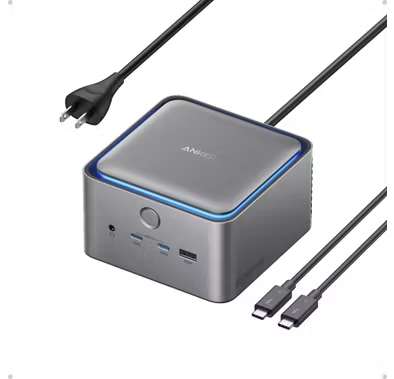
Green Lion HDMI Cable GN8KHDMI2MBK - 8K 48Gbps, Braided, Black
Porodo USB Hub PD51CHBBK - 4-Port USB 3.0 with USB-C Power, Black
Porodo HDMI Cable PD-8KHDM3-BK - 8K 3M, HDMI 2.1, Black
Green Lion Keyboard and Mouse GKM-100 - Wired USB, Black
Porodo Type-C to HDMI Cable PB-HDC2M-BK - 2M, 4K, Black
Porodo USB Hub PD35037IN1BK - 7-in-1, 100W PD, Black
Porodo USB-C Hub PDRDS71GY - 7-in-1, 100W PD, Gray
Porodo USB-C Hub PD91CHBGY - 9-in-1, 4K HDMI, 100W PD, Gray
Porodo USB Hub PDTC630GY - 6-in-1, 100W PD Charging, Black
Porodo Gaming Mouse PDX321 - 8D RGB, 7200 DPI, Black
Powerology USB-C Hub PWJT424BK - 4K HDMI, 100W PD, Black
Porodo Gaming Mouse PDX320 - 9D, 12800 DPI, RGB, Black
Porodo Gaming Mouse PDX324-BK - Triple Mode, 12000 DPI, Black
Green Lion USB-C Hub GN8N1HUBMGBK - 8-in-1, 100W PD, Black
Porodo Gaming Webcam PDX535 - 2K 30fps, Autofocus, Tripod, Black
Powerology USB-C Hub PWYSTC8721GY - 12-in-1, 100W PD, Grey
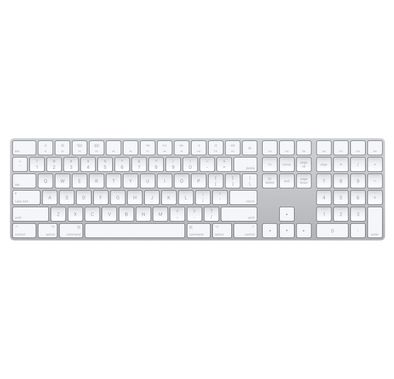
Green Lion Wireless Magic Keyboard GNMGKEY10GBK - USB-C, Black
Porodo USB Hub PDFWCH097GY - 4-Port USB 3.0, USB-C & USB-A, Gray
Green Lion USB-C Hub GHB7 - 7-in-1, Black
Porodo Wireless Keyboard and Mouse PD-W24KBM-BK - 2.4G+BT, Black
Porodo Multi-Port Hub PDIHRJ51GY - 100W PD, 5Gbps, Gray
Porodo USB Hub PD35038IN1BK - 8-in-1 Multi-Port, 100W PD, Black
Porodo Wireless Keyboard PDETK03BK - Bluetooth, Scissor Switch, Black
Porodo Gaming Mouse PDX322 - 7200 DPI, RGB, Black
Porodo USB Hub PBHUB0019GY - 4-in-1, USB-A & USB-C, Gray
Porodo HDMI Cable PD-8KHDM2-BK - 8K 48Gbps, 1.8M, Black
Powerology Smart Tag PPBCHAX2 - Bluetooth 5.3, Replaceable Battery
Green Lion Wireless Mouse & Keyboard Duo GNWLDUKYBKGY - USB, Grey
Powerology USB-C Hub P61HBCGY - 6-in-1 4K HDMI PD 100W, Dark Gray
FAQ
How do I know if a computer accessory is compatible with my device (Windows, Mac, etc.)?
To check compatibility, always look at the product description for supported operating systems like Windows, Mac, or Linux. Some accessories are universal, but others may only work with specific systems. For example, certain keyboards have Mac-specific keys, while some mice require Windows drivers. If you’re unsure, check the manufacturer’s website or customer reviews for real user experiences. It’s also helpful to contact Naml’s support team for advice before buying.What are the differences between wired, wireless, and Bluetooth accessories?
Wired accessories connect directly to your device using cables, offering stable connections and no need for batteries. Wireless accessories use a USB receiver or Bluetooth to connect, giving you more freedom of movement and less cable clutter. Bluetooth accessories are a type of wireless device that pair directly with your computer’s Bluetooth, which is great for portability. Each type has pros and cons: wired is reliable, wireless is convenient, and Bluetooth is versatile. Choose based on your workspace and how you plan to use the accessory.How can I judge the build quality and durability of a computer accessory?
Check the materials used—metal and high-grade plastics usually last longer than cheap plastics. Look for details like reinforced cables, sturdy connectors, and solid construction. Reading customer reviews on Naml and other sites can reveal if a product holds up over time. Trusted brands often have better quality control. If you need something for heavy daily use, invest in accessories with a reputation for durability, even if they cost a bit more.Why should I pay attention to brand reputation and customer reviews?
Brand reputation often reflects consistent quality and reliable customer service. Well-known brands usually offer better warranties and support if something goes wrong. Customer reviews give you real-world feedback about performance, durability, and any issues. For example, a product with many positive reviews is less risky than one with no feedback. Always check both the brand’s history and what buyers are saying before making a decision.How do I balance price and value for money when choosing accessories?
Don’t just go for the cheapest option—consider what features and quality you’re getting for the price. Sometimes paying a bit more means better durability, longer warranty, or extra features like ergonomic design. Compare similar products and read reviews to see if the higher price is justified. Look out for deals or bundles on Naml that offer more value. Always think about how often you’ll use the accessory and if it’s worth investing in something better.What kind of warranty and after-sales support should I expect?
Most reputable brands offer at least a one-year warranty covering manufacturing defects. Some brands provide extended warranties or easy replacement policies. Good after-sales support means you can get help with setup, troubleshooting, or returns if needed. Always check the warranty terms on Naml before buying, and keep your receipt for proof of purchase. If support is important to you, choose brands known for responsive customer service.How do I choose accessories with the right connectivity options (USB, USB-C, Bluetooth, etc.)?
First, check what ports your device has—older laptops may only have USB-A, while newer ones use USB-C or Thunderbolt. If you want wireless, make sure your device supports Bluetooth or has a free USB port for a receiver. Some accessories come with adapters for different ports. Think about your setup: if you move around a lot, Bluetooth might be best; for gaming, wired USB is often preferred. Always match the accessory’s connection type to your device for hassle-free use.What features should I look for in ergonomic or portable computer accessories?
For ergonomics, look for accessories designed to reduce strain, like keyboards with wrist rests or mice shaped to fit your hand. Adjustable stands and lightweight designs are great for portability, especially if you travel or work in different places. Some products have foldable or compact designs for easy packing. Read reviews to see if users find them comfortable for long use. Investing in ergonomic or portable accessories can help prevent discomfort and make your setup more flexible.How can I avoid buying accessories that won’t work with my setup?
Always double-check the compatibility section in the product listing and compare it with your device’s specs. Look for details about supported operating systems, required ports, and any special drivers. If you’re unsure, ask Naml’s customer support or check the Q&A section for similar questions. Reading reviews from users with the same device as yours can also help. Taking these steps reduces the risk of buying something you can’t use.What should I do if I receive a faulty or incompatible accessory from Naml?
If you receive a faulty or incompatible accessory, contact Naml’s customer service as soon as possible. Provide your order details and describe the issue clearly, including photos if needed. Naml usually offers returns or exchanges within a specific period, so check the return policy on the website. Keep all packaging and receipts until the issue is resolved. Acting quickly ensures you get a replacement or refund without hassle.
Expert Advice for Choosing the Right Computer Accessories
Enhance Your Digital Experience
Computer accessories are more than just add-ons—they’re essential tools that elevate your productivity, comfort, and enjoyment. The right accessories can transform your workspace, streamline your daily tasks, and even protect your valuable devices. Whether you’re working from home, gaming, or simply browsing, investing in quality computer accessories ensures a smoother, more efficient digital life.
Explore a World of Options
The world of computer accessories is vast and diverse. From ergonomic keyboards and high-precision mice to powerful external drives and immersive headsets, there’s something for every need and style. Leading brands like Anker for charging solutions, Lenovo for reliable peripherals, and AKG for premium audio offer a range of products designed to fit different preferences and budgets.
Making the Right Choice Can Be Tricky
With so many options, choosing the right computer accessory can feel overwhelming. Shoppers often wonder which features truly matter, how to ensure compatibility, or what distinguishes one brand from another. It’s common to be unsure about technical specifications or to get lost in the details of connectivity, durability, and performance.
Key Factors to Consider
When selecting computer accessories, it’s important to focus on compatibility with your existing devices, build quality, and the specific features that match your usage. Consider factors like wireless vs. wired, battery life, ergonomic design, and warranty support. Trusted brands such as Amazon and Acer are known for their innovation and reliability, making them solid choices for both home and office setups.
Understanding Quality and Price
Price points can vary widely, and it’s important to know what you’re getting at each level. Entry-level accessories may offer basic functionality, while mid-range and premium options provide enhanced durability, advanced features, and superior user experience. Investing in reputable brands like Anker or Lenovo often means better long-term value and peace of mind.
Your Comprehensive Buying Guide
To help you navigate the choices, we’ve created The Ultimate Buying Guide to the Best Computer Accessories in 2024. This detailed guide covers everything from must-have features and compatibility tips to brand comparisons and maintenance advice. Whether you’re a first-time buyer or looking to upgrade, our guide is designed to answer your questions and simplify your decision-making process.
Why Shop with Naml?
At Naml, we take pride in offering a carefully curated selection of computer accessories from trusted brands like Anker, Lenovo, and AKG. Our team ensures that every product meets high standards for quality and performance. Plus, with fast delivery and dedicated customer support, you can shop with confidence and convenience.
Tips for First-Time Buyers
If you’re new to buying computer accessories, start by identifying your primary needs—whether it’s comfort, speed, or connectivity. Read product descriptions carefully, check compatibility, and don’t hesitate to reach out to our team for personalized advice. Remember, investing in quality now can save you time and hassle later.
Shop with Confidence
Explore our collection of top-rated computer accessories and discover how the right tools can make a real difference in your daily routine. For more in-depth advice and expert recommendations, be sure to read our Ultimate Buying Guide. At Naml, we’re here to help you make informed choices—so you can shop with confidence and get the most from your technology.