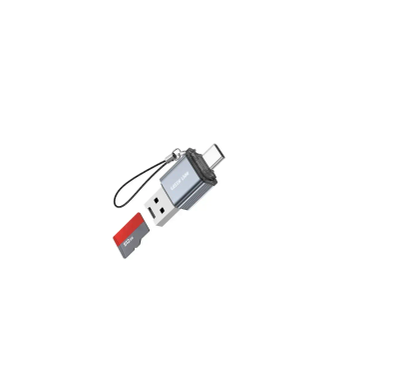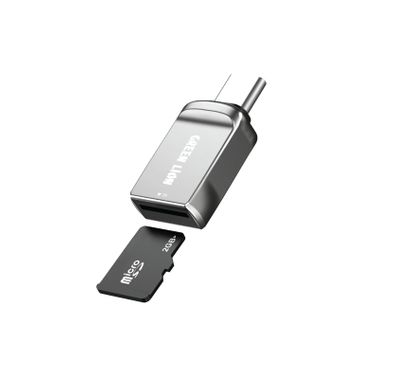
Green Lion Micro SD Card Reader - Type-C & USB-A, 2TB, Grey
Porodo TF Card Reader PDETK19BK - OTG Lightning, 480Mbps, Black
Porodo OTG Type-C TF/MicroSD Card Reader PDETK18BK - 480Mbps, Black
Green Lion Micro SD Card Reader - 3-in-1, USB-C & USB-A, Grey
Green Lion TF Card Reader GN4N1TCCARRGY - 4-in-1, 2TB Support, Grey
Porodo Card Reader PBCACRHBK - 2-in-1, Dual USB Type-C & USB 3.0, Black
Green Lion 3-in-1 SD Card Reader - USB-C & Lightning, Grey
FAQ
Which memory card formats are supported by most card readers?
Most memory card readers support popular formats like SD, microSD, and sometimes CompactFlash (CF). Some advanced models also handle formats like SDHC, SDXC, and even CFast. It's important to check the product details to make sure your specific card type is listed. For example, if you use a GoPro, you'll likely need microSD support, while DSLR cameras often use SD or CF cards. Always verify compatibility to avoid issues when transferring your files.How do I know if a card reader is compatible with my device (Windows, Mac, Android, iOS)?
Check the card reader's specifications for supported operating systems and connection types. Many readers work plug-and-play with Windows and Mac, but for Android or iOS, you may need a specific connector (like USB-C or Lightning). Some readers require additional apps for mobile devices. Always read the compatibility section and, if possible, look for user reviews mentioning your device. This helps ensure smooth operation and avoids returns.What is the difference between USB 2.0, 3.0, and USB-C in card readers?
USB 2.0 offers slower transfer speeds (up to 480 Mbps), while USB 3.0 can reach up to 5 Gbps, making file transfers much faster. USB-C is a newer connector that supports high speeds and is reversible, making it easier to plug in. If you often transfer large files, like 4K videos, choose a USB 3.0 or USB-C reader for better performance. Always check your device's port type to ensure compatibility.How important is the build quality and brand reputation for memory card readers?
Build quality affects durability and reliability, especially if you travel or use the reader frequently. Well-known brands often use better materials and offer warranties, reducing the risk of data loss or device failure. Cheaper, unknown brands might save money upfront but can cause problems later. Investing in a reputable brand like SanDisk or Kingston ensures your files are safe and the reader lasts longer. Always read reviews to gauge real-world performance.Can one card reader handle multiple card types at the same time?
Some card readers come with multiple slots for different card types, allowing you to use SD, microSD, and CF cards simultaneously. This is useful for photographers or videographers who use various devices. However, not all readers can transfer from multiple cards at once—some only read one card at a time. Check the product description for 'multi-slot' or 'simultaneous access' features. This saves time and reduces the need for multiple devices.How do I choose the right transfer speed for my needs?
Consider the size and type of files you transfer most often. For large files like RAW photos or 4K videos, a reader with USB 3.0 or USB-C and UHS-II support is ideal for faster speeds. If you mainly transfer documents or small photos, USB 2.0 may be sufficient. Always match the reader's speed with your memory card's speed rating for best results. Faster readers save time and reduce waiting during big transfers.Are memory card readers portable and easy to carry?
Many memory card readers are compact and lightweight, making them easy to carry in a bag or even a pocket. Some models have built-in cables or protective covers for added convenience. If you travel often, look for a reader with a sturdy design and minimal moving parts. Portability is especially important for photographers and content creators on the go. Always check the dimensions and weight before buying.What should I do if my card reader is not recognized by my device?
First, try connecting the card reader to a different USB port or device to rule out port issues. Make sure your operating system is updated and check if drivers are needed, especially on Windows. For mobile devices, ensure you have the correct adapter (USB-C, Lightning, or OTG). Sometimes, restarting your device or using a different cable helps. If problems persist, consult the manufacturer's support or check for firmware updates.Is it safe to leave my memory card in the reader when not in use?
It's generally safe to leave your memory card in the reader, but it's better to remove it when not in use to prevent accidental data corruption or damage. Power surges or improper ejection can harm your files. Always use the 'safely remove hardware' option before unplugging. For long-term storage, keep cards in protective cases away from dust and moisture. This helps extend the lifespan of both the card and the reader.How many card slots do I need in a memory card reader?
The number of slots you need depends on how many types of cards you use. If you only use one type, like microSD, a single-slot reader is enough. For photographers or professionals with multiple devices, a multi-slot reader (SD, microSD, CF) is more convenient. Multi-slot readers save time by allowing you to transfer from different cards without swapping. Consider your workflow and future needs before choosing.
Expert Advice on Choosing the Right Memory Card Reader
Why Memory Card Readers Matter
Reliable memory card readers are essential tools for anyone who values fast, secure, and convenient data transfer. Whether you’re a professional photographer, a content creator, or simply looking to back up your files, a good card reader streamlines your workflow and protects your valuable data. The right device ensures your photos, videos, and documents move quickly and safely between devices, saving you time and reducing frustration.
Wide Range of Options
The market offers a diverse selection of memory card readers, from compact single-slot models to advanced multi-format hubs. You’ll find readers supporting SD, microSD, CFexpress, and more, with options for USB-A, USB-C, and even wireless connectivity. This variety means there’s a solution for every device and workflow, whether you need portability for travel or high-speed transfers for large media files.
The Challenge of Choosing
With so many formats and technical specifications, choosing the right memory card reader can be confusing. Many buyers are unsure which reader is compatible with their devices, or what speed ratings actually mean for real-world use. It’s common to wonder if you need a multi-card reader, or if a simple, dedicated model will suffice. Understanding these differences is key to making a smart purchase.
Key Factors to Consider
When selecting a memory card reader, consider compatibility with your cards and devices, supported transfer speeds, build quality, and portability. Look for features like UHS-II or CFexpress support if you work with high-resolution media. Also, check for robust construction and reliable brand reputation—these factors can make a significant difference in long-term performance and data safety.
Quality vs. Price
Memory card readers come in a range of price points. Entry-level models are affordable and suitable for basic needs, but may offer slower speeds or limited compatibility. Mid-range and premium readers from brands like SanDisk, Kingston, and Lexar provide faster transfers, broader support, and enhanced durability. Investing in a quality reader can save you time and prevent data loss, especially if you handle large files regularly.
In-Depth Buying Guide
To help you navigate these choices, we’ve prepared a comprehensive buying guide: "Choosing a Memory Card Reader: What Actually Matters." This guide covers compatibility, speed ratings, connector types, and practical tips for every user. We encourage you to read the full article on our blog for detailed insights and expert recommendations.
Why Shop at Naml
At Naml, we curate a selection of trusted memory card readers from leading brands, ensuring you have access to reliable, high-performance options. Our team carefully reviews each product for quality and compatibility, so you can shop with confidence. Enjoy fast delivery across the UAE and dedicated customer support for any questions you may have.
Tips for First-Time Buyers
- Check your device’s ports and card formats before purchasing.
- Consider future needs—choose a reader that supports multiple formats if you use different devices.
- Prioritize reputable brands for better reliability and warranty support.
Shop with Confidence
Explore our collection of memory card readers and find the perfect match for your workflow. With expert advice, a curated selection, and a detailed buying guide, you’re equipped to make an informed choice. Shop confidently at Naml and experience seamless data transfer, every time.